
How to Set Up Online Salon Booking in the UAE: A Practical Guide
WhatsApp is excellent for speaking with clients. It is less effective as the main record of a busy salon’s availability.
A client asks for Friday afternoon. The receptionist checks one stylist’s messages, another stylist’s calendar and whether a treatment room is free. While that conversation continues, another client may be asking for the same time.
Online salon booking removes much of this back-and-forth, but only when the system is configured around how the salon actually works. A poorly configured calendar simply turns manual confusion into digital confusion.
This guide explains how UAE salons, barbershops and beauty businesses can set up online booking correctly, from the service menu and stylist schedules to add-ons, payments and launch.
Before choosing software, map how the salon operates
Begin with the salon’s real workflow rather than the software’s feature list.
For each service, identify:
- How long the treatment normally takes.
- Which stylists or technicians can perform it.
- Whether it requires a particular chair, room or machine.
- How much preparation or cleanup time is needed.
- Which add-ons customers can select.
- Whether payment, a deposit or no advance payment is required.
This exercise often reveals why the existing diary is difficult to manage. The problem may not be the number of bookings. It may be that service durations are inconsistent, equipment is shared or staff availability is stored in several places.
Good salon booking software should reflect these realities instead of forcing every treatment into the same appointment template.
Step 1: Create a clear, bookable service menu
A customer should understand what they are booking without needing to send a message for basic information.
Each online service should have:
- A specific, recognisable name.
- A short description of what is included.
- An accurate duration.
- A clear price or starting price.
- Any preparation instructions.
- Relevant cancellation or deposit information.
Avoid combining too many treatments under vague names such as “Hair Service” or “Beauty Appointment.” A client choosing a haircut needs different information and timing from someone booking colour correction or a facial.
At the same time, do not create dozens of nearly identical services that make the booking page difficult to navigate. Use categories and straightforward naming to keep the menu manageable.
Example service structure
- Women’s Cut and Finish: Consultation, wash, haircut and styling.
- Root Colour: Root application with an optional blow-dry add-on.
- Classic Manicure: Nail shaping, cuticle care and polish.
- Laser Hair Removal Consultation: Initial assessment before treatment.
The customer should know what they are receiving, while the system receives enough information to calculate the correct availability.
Step 2: Separate staff from physical resources
A stylist is not always the only thing a service requires.
A haircut may need one stylist and one chair. A facial may need a therapist and a treatment room. A laser appointment could require a qualified technician, a room and a particular machine.
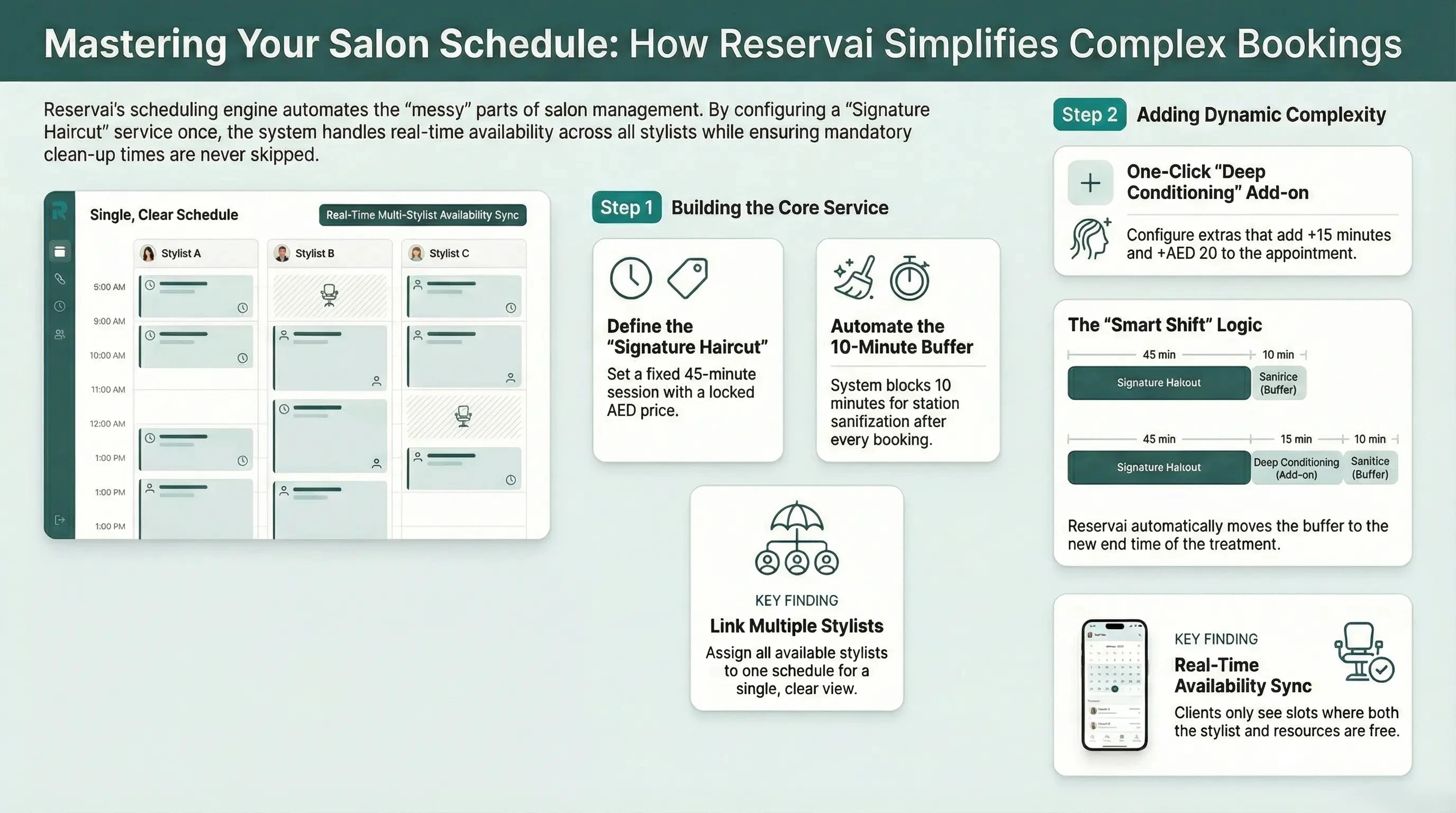
Salon booking software should treat those requirements separately. A time should be offered only when the staff member and any required physical resources are available.
This distinction becomes especially important when:
- Several stylists share the same specialist equipment.
- A salon has fewer treatment rooms than employees.
- One machine is used for several different services.
- Staff members work across multiple branches.
- A room or asset is temporarily unavailable.
Not every appointment needs complicated resource rules. Keep simple services simple, and add resource requirements only where they reflect a genuine operational dependency.
Step 3: Build a schedule the team can realistically maintain
Publishing opening hours is not enough. The booking system also needs to understand when each stylist, technician and resource is available.
Configure:
- Branch opening hours.
- Individual staff working days and shifts.
- Break periods.
- Planned holidays and absences.
- Equipment or room availability.
- Preparation and cleanup buffers.
Buffers are particularly useful in beauty businesses. A treatment room may need cleaning after each client, while a stylist may need time to prepare their station before the next appointment.
If a 45-minute service consistently requires another 15 minutes before the station is ready, the online schedule should reserve the full operational time. Otherwise, the calendar may look efficient while the salon runs late throughout the day.
Step 4: Configure add-ons without breaking the calendar
Add-ons can make booking more convenient for clients and increase the value of an appointment. They can also create scheduling problems if their time and resource requirements are ignored.
For every add-on, decide whether it:
- Adds to the price.
- Extends the appointment.
- Runs at the same time as the main service.
- Requires another staff member.
- Uses separate equipment or a room.
- Must always be included with a particular service.
For example, a conditioning treatment may add both time and price to a haircut. A treatment that develops while another part of the service continues may affect price without extending the appointment by its full duration.
The important point is accuracy. The time displayed to the customer and the time reserved in the salon calendar must represent what the team will actually deliver.
Step 5: Decide how customers will pay
Different salon services may need different payment rules.
A standard haircut may be paid in the salon. A long colour appointment could require a deposit. A higher-value treatment may be paid in full during booking.
Before enabling online payments, decide:
- Which services require advance payment.
- Whether the salon accepts deposits or full payment.
- Whether cash or pay-later bookings are allowed.
- When a customer can cancel without charge.
- How refunds will be handled.
- Which rules apply to late cancellations and no-shows.
These policies should be written in plain language and displayed before confirmation. Customers are more likely to accept a policy when they see it before paying, rather than after a cancellation occurs.
Reservai Payments allows eligible UAE businesses to accept card bookings without connecting their own separate payment gateway. Business verification and KYC requirements still apply for payment processing and payouts.
Step 6: Create the customer booking journey
A salon can offer online booking in two main ways:
- Standalone booking page: Useful when the business does not have a website or wants a simple link to share.
- Website booking widget: Useful when the salon wants clients to book without leaving its existing website.
The same booking link can also be shared through Instagram, a Google Business Profile, email campaigns or WhatsApp conversations.
Before publishing it, open the page on a phone and complete a booking as a customer. Check whether:
- The service categories are easy to browse.
- Prices and durations are clear.
- The customer can choose a stylist where appropriate.
- Available times are easy to understand.
- Add-ons do not make the checkout confusing.
- The payment requirement is shown before confirmation.
- The confirmation explains what happens next.
Most customers will not study the page carefully. The journey should make sense even when someone is booking quickly from a social-media link.
Step 7: Test real salon scenarios
Do not launch after testing only one simple appointment. Use situations that normally cause problems for the reception team.
Test whether the system behaves correctly when:
- A customer requests a particular stylist.
- Two services depend on the same treatment room.
- An add-on extends the appointment.
- A staff member is working at another branch.
- A booking ends immediately before a scheduled break.
- A required machine is already reserved.
- A customer selects card payment.
- A customer selects an allowed pay-later option.
- A booking is cancelled or amended.
Ask a staff member who did not configure the system to perform the test. They are more likely to notice assumptions that the person building the setup has stopped seeing.
Step 8: Launch without creating a second calendar
Once online booking is active, the salon should avoid maintaining a separate paper diary or private staff calendar that the system cannot see.
Phone, reception and walk-in bookings should be recorded in the same scheduling system. Otherwise, customers may be shown availability that has already been taken offline.
During launch:
- Add the booking link to the salon website.
- Place it prominently on social profiles.
- Save a standard WhatsApp reply containing the link.
- Create a reception QR code for future appointments.
- Show staff how to block unavailable time correctly.
- Explain who is responsible for changing schedules and services.
- Review the first week of bookings for setup mistakes.
Online booking should become the salon’s shared source of availability, not another channel the receptionist must reconcile manually.
Common salon booking setup mistakes
Using the same duration for every stylist
Experience, service method and treatment complexity can affect timing. Use realistic durations rather than forcing the day into perfect-looking blocks.
Forgetting cleanup and preparation time
A fully booked calendar is not useful if the team cannot reset the station between customers.
Making every service too complicated
Resource rules are valuable when they prevent a real conflict. Unnecessary rules make availability harder to configure and understand.
Publishing unclear prices
If a final price depends on hair length, product quantity or an in-person assessment, explain that clearly. Do not present an exact online price if the salon cannot honour it.
Promising reminders that are not configured
Confirm which email, SMS or WhatsApp notifications are active before telling customers they will receive them.
Failing to keep offline bookings in the system
An online calendar can only prevent conflicts when it contains the appointments accepted by phone, in person and through other channels.
What should salon booking software include?
A UAE salon should generally look for:
- A mobile-friendly customer booking page.
- Separate schedules for stylists and technicians.
- Branch-specific availability.
- Rooms and equipment as bookable resources.
- Service add-ons with accurate time and pricing.
- Preparation or cleanup buffers.
- Deposits, card payments and pay-later options.
- Clear booking and payment records.
- A customer area for reviewing bookings.
- A website widget or shareable booking link.
- Transparent subscription, commission and messaging costs.
The priority depends on the business. A solo nail technician may need only services, availability and a payment option. A multi-branch salon may require permissions, several staff calendars and shared equipment management.
How Reservai supports salon booking
Reservai is designed for UAE service businesses, including salons, barbershops and beauty providers. It supports appointments that depend on staff, treatment rooms or equipment, as well as service add-ons and preparation buffers.
Businesses can publish a dedicated booking page or embed their services into an existing website. Reservai also supports several payment arrangements, including card processing through Reservai Payments for eligible businesses.
The Free Plan has no monthly subscription fee, with commissions and applicable fixed charges applied when bookings occur. Account limits and payment requirements should be reviewed against the salon’s expected volume before launch.
Learn more about Reservai salon booking software for UAE businesses.
Frequently asked questions
Does online salon booking replace WhatsApp?
No. WhatsApp can remain available for consultations and customer questions. The booking system becomes the reliable place for services, prices, availability, confirmation and payment.
Can clients choose their preferred stylist?
Yes, when the service and staff availability are configured to allow customer selection. A salon can also offer the first available suitable team member when preference is not important.
Can salon software manage rooms and machines?
A resource-aware platform can coordinate staff with treatment rooms and equipment. Confirm this capability if several services share limited physical assets.
Does a salon need its own payment gateway?
That depends on the platform. Reservai Payments handles eligible card bookings without requiring the salon to connect a separate gateway. Verification, processing charges and payout requirements still apply.
How long does it take to set up salon booking software?
A small salon with a short service menu can establish the basic setup relatively quickly. A multi-branch business with many staff members, services and shared resources should allow more time for configuration and testing. Accuracy is more important than publishing the page in a specific number of minutes.
Move from messages to a dependable booking process
The value of online salon booking is not simply that customers can choose a time. It is that the time shown is one the salon can confidently deliver.
A clear service menu, accurate staff schedules, proper resource allocation and sensible payment policies create a booking experience that works for both the client and the team.
Build the setup around the salon’s real day, test the difficult cases and give every booking channel access to the same availability. That is what turns booking software from another administrative tool into a useful part of the operation.