
Mobile Service Scheduling in the UAE: A Practical Guide for Field Teams
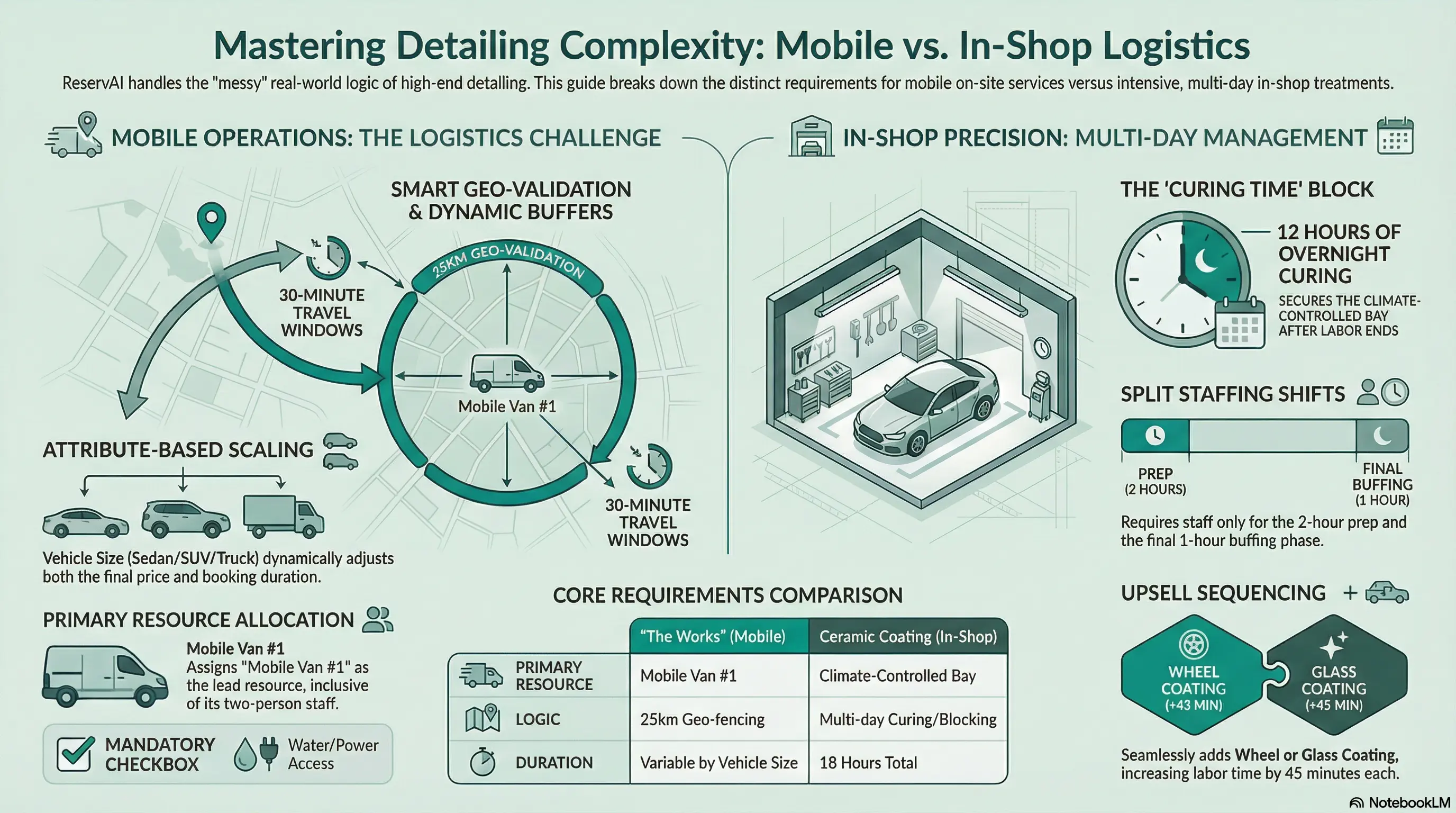
A mobile service team can have an empty calendar slot and still be unavailable for the next job.
The cleaner may be finishing on the other side of the city. The mechanic may have the time but not the required equipment. A two-person job may appear bookable even though only one team member is available.
This is why mobile service scheduling requires more than placing appointments on a calendar. The business must consider service duration, travel, team composition, equipment, customer location, pricing and payment before it confirms a booking.
This guide explains how UAE cleaning companies, mobile mechanics, maintenance teams and other field-service businesses can create a more dependable booking process without promising automation the software cannot actually deliver.
First, separate booking from dispatch and routing
Booking, dispatch and route optimisation are related, but they are not the same function.
- Booking software lets customers select services, provide information, choose available times and make payments.
- Dispatch software assigns confirmed work to a particular employee or team.
- Route-optimisation software calculates travel sequences using locations, distance and potentially live traffic.
Some field-service platforms combine all three. Others specialise in one part of the workflow.
Reservai supports online booking, service configuration, resource availability, pricing rules and configured buffers. It should not currently be presented as live GPS dispatch or automatic route-optimisation software.
If real-time vehicle tracking, traffic-aware routing or turn-by-turn optimisation is essential, use a dedicated field-service or routing product alongside the booking platform.
Step 1: Define exactly where the business operates
Before customers can book, decide which locations the team can realistically serve.
A service area might cover:
- One emirate.
- Selected cities or communities.
- A defined distance from a branch.
- Different areas on different days.
- Wider coverage for higher-value jobs.
Publish this information clearly on the service page. If availability or price depends on the customer’s location, explain that before checkout.
Do not accept an apparently confirmed booking and only later tell the customer that their area is unavailable or carries an unexpected travel charge.
If service-area eligibility is not automatically validated, the business should review the address before final confirmation or use booking language that makes the review process clear.
Step 2: Calculate the real duration of each job
A one-hour service rarely consumes exactly one hour of the working day.
The operational time may include:
- Preparing and loading equipment.
- Travelling to the customer.
- Finding parking or building access.
- Completing the service.
- Packing equipment afterward.
- Travelling to the next appointment.
Booking only the time spent inside the customer’s property creates an unrealistic schedule.
Use historical experience to estimate a reasonable buffer after each service. The buffer can vary according to the type of work. A short home consultation may need less time than a deep-cleaning job involving several machines.
A configured buffer is not the same as dynamic travel calculation. It will not know that one customer is in Dubai Marina and the next is in Mirdif. It is a planning allowance that reduces the risk of impossible back-to-back bookings.
Review these buffers regularly. If teams are consistently early, the allowance may be too generous. If they are repeatedly late, the schedule needs more time or smaller service areas.
Step 3: Book the team and equipment together
Many mobile services cannot be delivered by a single available person.
A deep-clean may require two cleaners and an industrial machine. A roadside service could require a technician and a suitably equipped vehicle. An inspection might need both a qualified surveyor and specialist equipment.
The booking system should reserve every required resource for the same period.
Depending on the service, resources may include:
- Employees or contractors.
- Established teams or crews.
- Service vehicles.
- Cleaning or repair equipment.
- Portable treatment devices.
- Other limited physical assets.
A second cleaner is not a customer add-on simply because the service needs two people. They are part of the operational resource requirement.
Customer add-ons should be reserved for optional purchases, such as an additional cleaning task or upgraded treatment. Team members and equipment should be configured as the resources needed to fulfil those purchases.
Step 4: Let job complexity affect time and price
Mobile services often vary according to what the customer selects.
Cleaning a studio is different from cleaning a four-bedroom villa. Servicing a compact car may require different time and equipment from servicing a large SUV. A basic maintenance visit differs from one that includes several additional tasks.
When the platform supports attribute-based pricing, customer selections can adjust both the booking price and the time reserved.
Useful pricing factors might include:
- Property or vehicle type.
- Number of bedrooms or rooms.
- Service duration.
- Quantity of items.
- Selected add-ons.
- Number of people receiving the service.
- Hourly or daily rental requirements.
Keep the choices understandable. Customers should not need industry knowledge to receive a quote.
If the business cannot calculate an accurate price without an inspection, offer a consultation or quote-request service rather than presenting an unreliable fixed price.
Step 5: Collect the information the team genuinely needs
A vague appointment description creates problems before the team leaves the office.
Collect the details needed to prepare for the work, such as:
- The full service address.
- Building or access instructions.
- Parking information where relevant.
- The selected service and options.
- Customer notes.
- A reliable phone number.
- Any preparation the customer must complete.
Keep the booking form focused. Asking for too much information increases abandonment, while asking for too little creates follow-up work.
If photographs are essential for quoting, confirm that the chosen platform supports customer file uploads. Reservai should not currently be promoted as offering mandatory photo uploads in its standard booking flow. Until that capability is available, request images through a clearly defined follow-up process.
Step 6: Choose payment rules that match the job
Payment policy can reduce uncertainty for both the customer and the field team.
The business may choose to:
- Collect the full amount during booking.
- Take a deposit and collect the balance later.
- Allow cash or another approved pay-later method.
- Collect payment only after an inspection or final quote.
Higher-value jobs, long travel distances and appointments requiring several team members may justify an advance payment or deposit.
Before publishing the service, explain:
- What the customer is paying for.
- Whether the price can change after inspection.
- When the balance becomes due.
- How cancellation affects a deposit.
- What happens when access to the property is unavailable.
Reservai Payments allows eligible UAE businesses to take card bookings without connecting their own separate payment gateway. Verification, processing charges, commission and payout requirements still apply.
Step 7: Keep every booking in one schedule
Online booking cannot prevent conflicts when phone, WhatsApp and repeat-customer appointments are stored elsewhere.
Every confirmed job should block the relevant team and resources in the same system, regardless of where the request originated.
This includes:
- Website bookings.
- Bookings created from a shared link.
- Appointments arranged through WhatsApp.
- Jobs accepted over the phone.
- Repeat work booked by a staff member.
- Manual or walk-in requests where applicable.
The online calendar should represent the business’s real capacity. Otherwise, customers may book time that has already been promised through another channel.
Step 8: Build a daily operating routine around the schedule
Software does not remove the need for operational discipline.
Before each working day, the coordinator or team leader should review:
- The confirmed jobs and addresses.
- The staff assigned to each booking.
- The equipment and vehicle requirements.
- Customer access notes.
- Payment status.
- Travel allowances between jobs.
- Any cancellations or amendments.
The team should also know who is authorised to change a booking and how a delay is communicated to later customers.
A good system makes the information visible. A good operating routine ensures the team acts on it.
How to know when the business is ready to add capacity
Scaling should be based on repeated demand, not one unusually busy week.
Watch for patterns such as:
- Popular time slots remaining fully booked.
- Regular rejection of suitable jobs because no team is available.
- Equipment becoming the main capacity constraint.
- Travel buffers consuming too much of the working day.
- Consistent demand in a location far from the current branch.
- High-value services being displaced by less profitable work.
These patterns can indicate whether the next investment should be another employee, a second crew, more equipment, an additional vehicle or a new service area.
Adding capacity without understanding the constraint can increase costs without creating more bookable work.
Common mobile scheduling mistakes
Promising live routing when the system only uses buffers
Static buffers can improve a schedule, but they should not be described as traffic-aware route optimisation.
Allowing customers to book outside the service area
Set expectations before checkout and review location-dependent bookings where necessary.
Treating staff as optional add-ons
The team required to perform the job should be part of the service’s resource configuration.
Ignoring loading, parking and access time
Field work begins before the employee reaches the customer’s door.
Offering an instant price for work that requires inspection
A clear quote-request process is better than an inaccurate fixed price.
Maintaining separate online and WhatsApp calendars
All confirmed work must reduce availability in the same schedule.
What mobile service scheduling software should handle
When evaluating a home-services booking platform, check whether it can:
- Offer customers an easy mobile booking page.
- Store the service address and access notes.
- Manage staff, teams, vehicles and equipment.
- Reserve several required resources together.
- Apply realistic service durations and buffers.
- Adjust pricing and duration according to customer selections.
- Handle deposits, card payments or approved pay-later options.
- Show booking details and payment status clearly.
- Embed booking into an existing website.
- Scale across additional staff, services or branches.
If the business also needs live routing, technician tracking, mileage records, work orders or on-site signatures, confirm those features separately. They belong to broader field-service management rather than basic online booking.
Where Reservai fits
Reservai is suitable for UAE service businesses that need customers to book appointments or jobs online while the platform coordinates staff and other required resources.
Businesses can configure service durations, add-ons, pricing factors and buffers. They can publish a standalone booking page or embed services into an existing website.
The Free Plan has no monthly subscription fee. Commissions and applicable fixed charges are applied when bookings occur, and account limits should be reviewed before launch.
Reservai does not currently replace specialised route-optimisation or GPS field-service software. It can manage the booking and resource side of the workflow while the business uses appropriate operational tools for dispatch and routing.
Frequently asked questions
Can Reservai calculate travel time automatically?
Reservai can apply configured buffers around services. It should not currently be described as calculating live travel time from traffic or customer locations. Businesses that need dynamic routing should use dedicated route-planning software.
Can a booking reserve multiple team members?
Services can be configured around multiple required resources. The exact setup depends on whether the business assigns named individuals, crews, pooled staff or equipment.
Can customers receive an instant quote?
Attribute-based pricing can calculate a price when the relevant factors are known in advance. Jobs requiring an inspection should use a consultation or quote-request process.
Is this suitable for cleaning and mobile mechanic businesses?
Yes, when the main need is online booking, resource availability, variable service configuration and payment collection. Businesses needing live vehicle tracking, work-order management or route optimisation may also require specialised field-service software.
Do I need my own payment gateway?
Reservai Payments handles eligible card bookings without requiring the provider to connect a separate gateway. Business verification, fees and payout requirements still apply.
Scale the schedule before scaling the team
A mobile service business does not become easier to operate simply because it has more employees. Growth magnifies whatever scheduling process already exists.
Define service areas, calculate realistic durations, reserve the right people and equipment, and keep every confirmed job in one schedule. Then add capacity when the booking data shows where the real constraint lies.
To manage online bookings, resources and payment options for a UAE field-service business, explore the Reservai booking platform.